
Download a Free Divi Layout – Stunning Hero Section with Beautiful Animation Divider
We may earn a commission from affiliate links in this post. Disclosure policy
Looking to make your website stand out? This detailed Divi tutorial will guide you step-by-step on how to download a free Divi layout featuring a hero section with a beautiful animation divider designed by Divi Lover fully compatible with Divi 5. You’ll learn how to import, customize, and style this Divi layout using CSS, animation settings, and Divi modules inside the Divi builder. Whether you’re a beginner or an experienced designer, this Divi theme layout will help you create an eye-catching and professional web design.
What Makes This Free Divi Hero Section Layout So Special
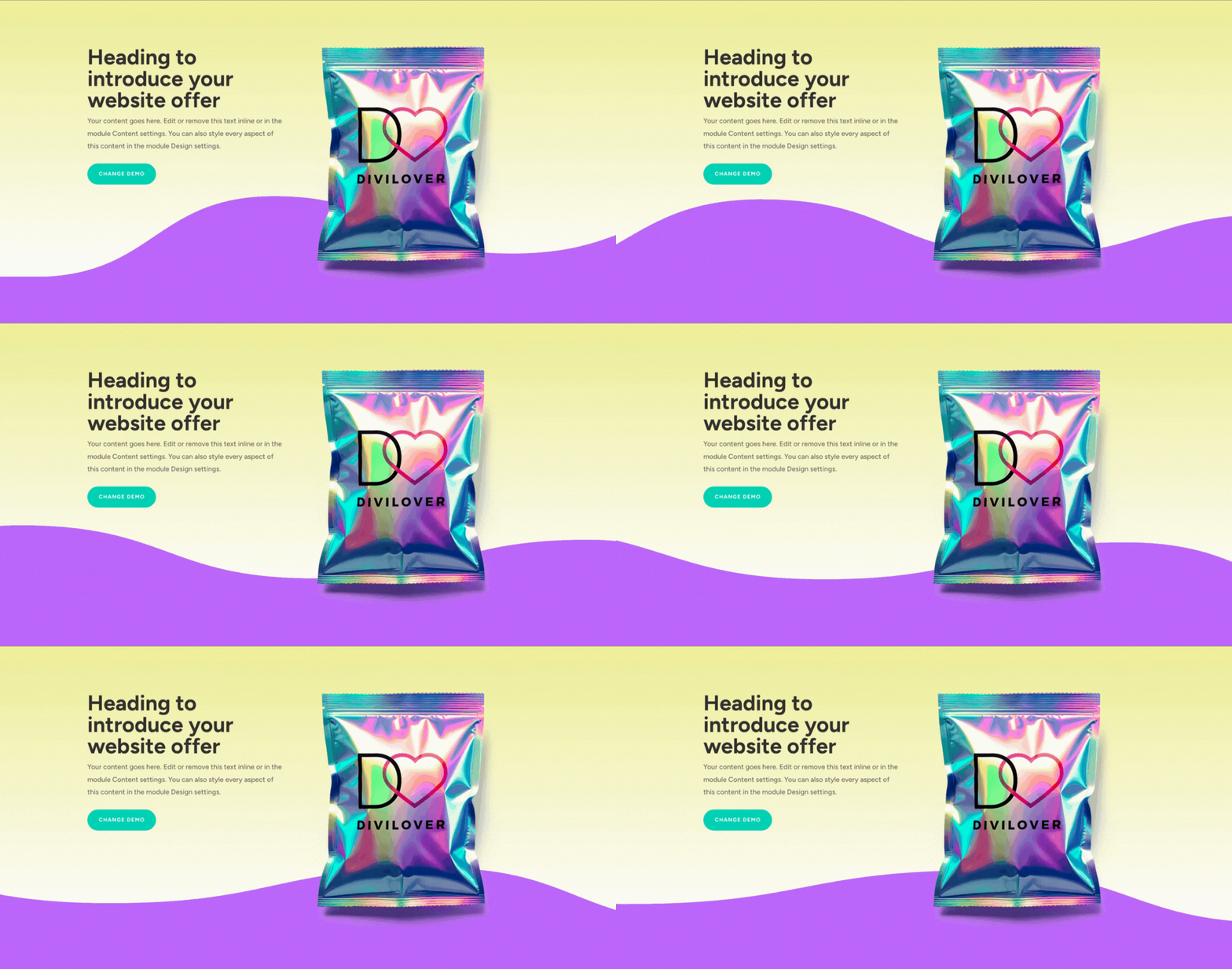
This free Divi layout offers more than a typical hero section it’s a complete design solution crafted by Divi Lover for creative professionals and website owners. It includes a dynamic animated divider and smooth animation effects that make your Divi website look elegant and interactive.
Built with the Divi theme builder, this Divi layout ensures full responsiveness, allowing your hero section to adapt perfectly across all devices. The animation and divider effects create an immersive user experience, keeping visitors engaged from the first moment they land on your site.
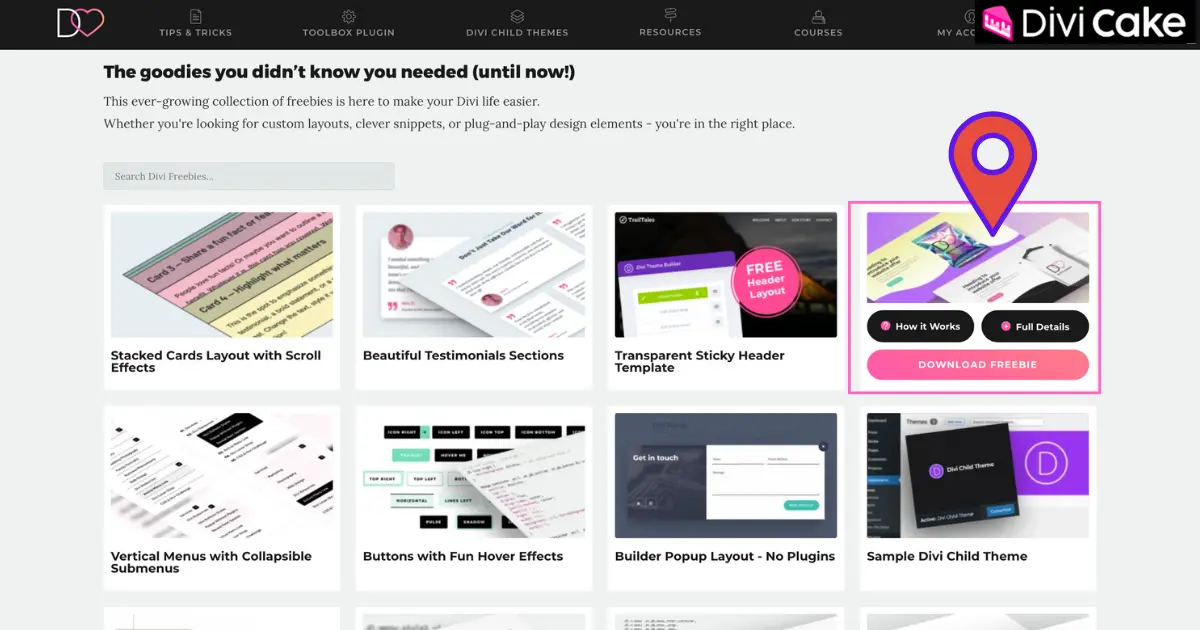
How to Download a Free Divi Layout from Divi Lover
To begin, you’ll need to download a free Divi layout directly from the Divi Lover website. Click download to access your JSON file for free. This file contains the complete Divi layout pack, including the animated divider, text modules, background layers, and hero section design.
Once you download the JSON file, save it to your computer. You can access this layout for free and import it directly into your Divi theme layouts or Divi Library for future use. However, before uploading it to Divi, make sure to unzip the downloaded file. If you’re new to Divi Lover, you’ll need to subscribe to their newsletter to unlock the Freebie Library and receive weekly Divi tips, tutorials, and design resources.
How to Import the Free Divi Hero Section with Animated Divider
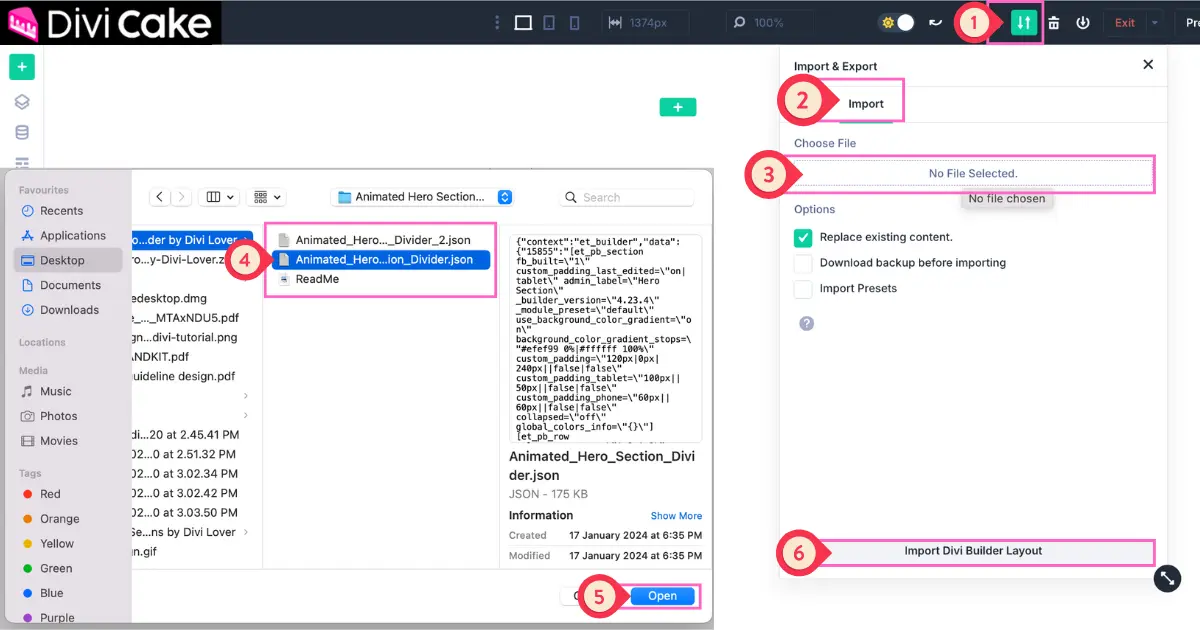
Open your Divi page builder on the page where you want to add the hero section layout. Click the portability icon (the up and down arrows), select “Import,” and choose the JSON file you downloaded earlier.
Follow These Steps to Import Easily
- Click on the Import & Export button (the up and down arrows) as shown in the screenshot below.
- Select the Import option.
- Click on the Choose File button.
- Select one of the two style sections provided.
- Click on the Open button.
- Finally, click on the Import Divi Builder Layout button.
After importing, your free Divi layout will instantly appear within the Divi builder. This layout includes the animated section divider, CTA button, and header text styled with modern Divi modules. The section shows professional design elements that align perfectly with your Divi theme.
Customizing the Hero Section Text and CTA in Divi Builder
Once imported, you can start editing the hero section content using the Divi builder. Replace the placeholder text with your own headline and adjust the CTA button to fit your brand for example, “Download Today” or “Explore Divi Layouts You Can Download.”
The Divi modules make it simple to adjust font size, colors, and alignment. You can even add hover effects or transitions. This Divi tutorial helps ensure your hero section layout communicates your message clearly while encouraging user interaction through an effective CTA.
Editing the Background Image and Colors in the Divi Theme
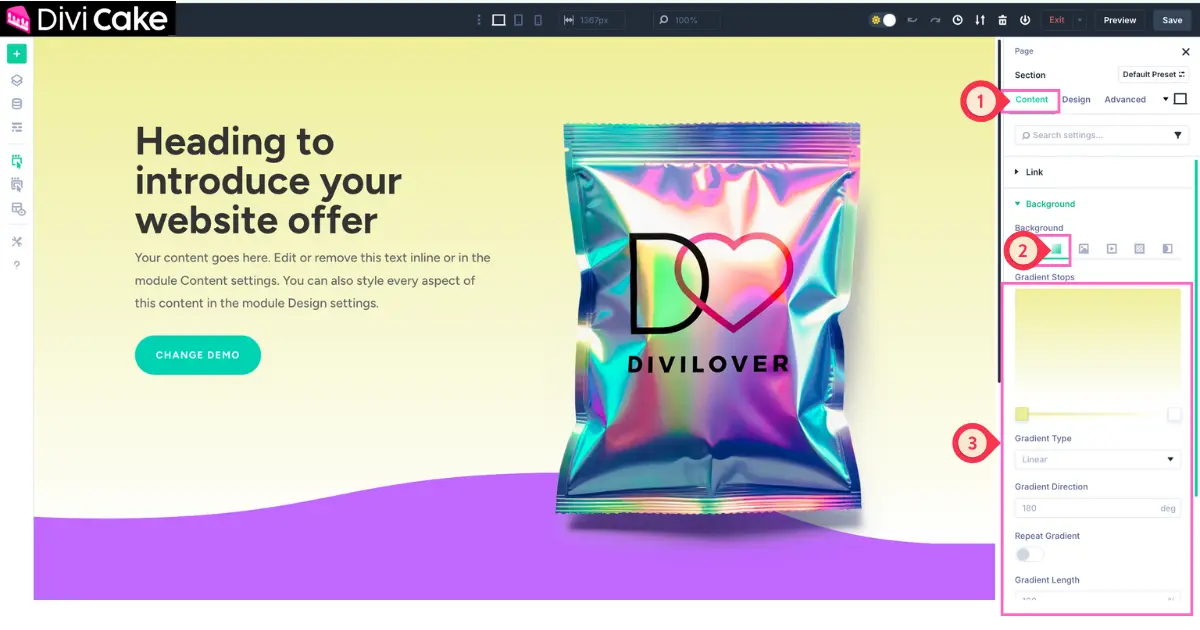
To personalize your free Divi layout, modify the background of your hero section. Replace the existing hero image with one that reflects your brand. Within the Divi builder, select the section’s background settings and choose an image, gradient, or video.
Follow These Steps
- Select the Section Settings and click on the Content tab.
- Open the Background option and click on the Gradient button.
- Adjust the colors and other settings as shown in the screenshots below.
You can apply custom CSS to fine-tune brightness or opacity. When you use Divi, the page builder ensures that all background styles remain responsive. This layout is ideal for landing page layouts that need a visual impact right at the top of the page.
Customizing the Animated Divider Using CSS in Divi 5
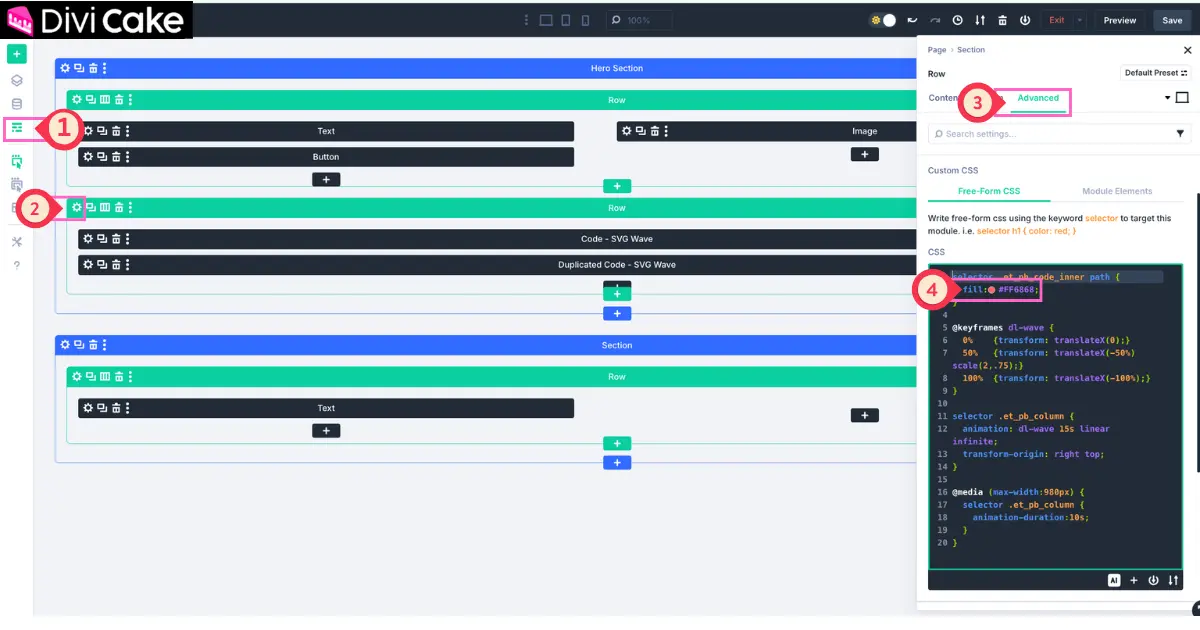
The signature design element of this Divi layout is the animated divider. It adds a wave-like transition that separates your hero section from the next content area. You can edit the size of the divider, change its color, or apply custom code for a unique look.
Follow These Steps to Customize
- Click on the Wireframe View button as shown in the screenshot below.
- Click on the Page Section Settings (Gear Icon) button.
- Go to the Advanced tab.
- Adjust the color as shown in the screenshot.
Within the Divi code module, paste the provided CSS code from Divi Lover, or create your own section dividers using custom CSS. You can also tweak the animation duration and smoothness. The animated waves as section dividers give your site a polished, professional feel.
Fine-Tuning the Animation Settings for the Hero Section Layout
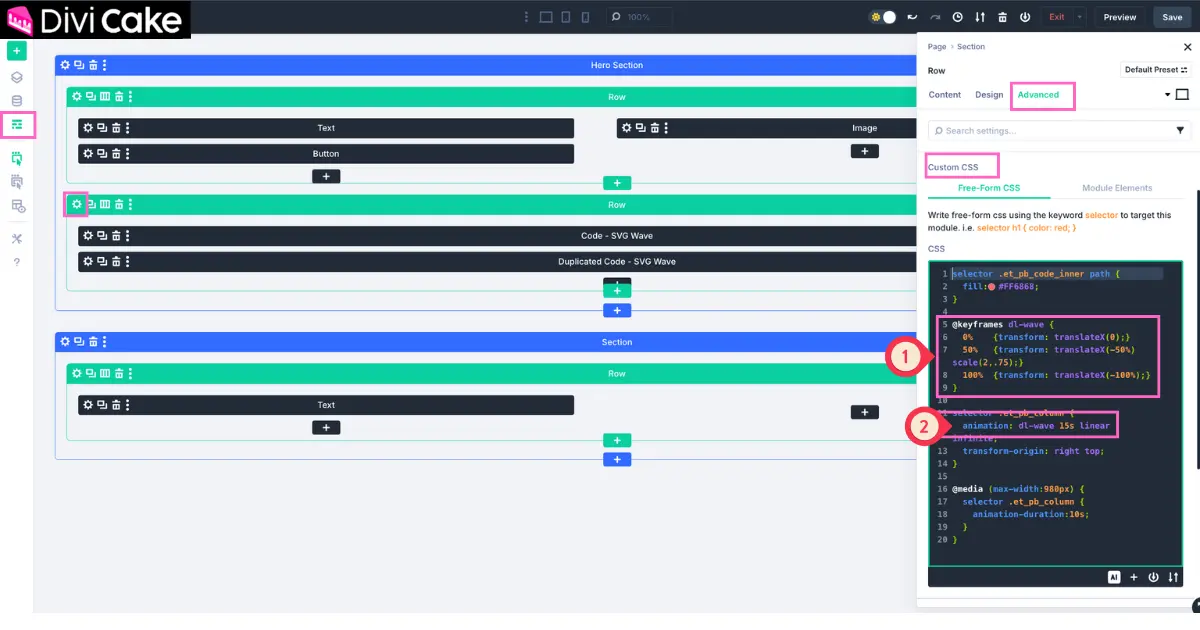
Inside the Divi builder, open the module that includes the animated elements of the hero section. Under the animation tab, you can adjust the speed, direction, and trigger point for each element. For example, you can make the divider fade in from the bottom or slide in with a delay.
Follow These Steps
- Below the Color CSS, locate the Transform TranslateX option you can adjust it as needed.
- Easily change the Animation Speed as shown in the screenshot.
The Divi Toolbox plugin is another great way to add more complex animations. Using the Divi Toolbox, you can implement scroll effects, parallax backgrounds, and movement that enhances the Divi design. This keeps your animation hero section smooth and visually appealing.
Optimizing the Free Divi Layout for Mobile and Tablet Devices
Every Divi user knows that a great design must be mobile-friendly. The free layout is already optimized for all screen sizes, but you can still fine-tune it. Switch to the responsive preview mode in the Divi builder and check spacing, font size, and alignment.
Elegant Themes, the creators of Divi, built the Divi theme to automatically adjust modules across devices. Still, reviewing your animated divider and hero section layout ensures your page’s hero section looks perfect on tablets and smartphones.
Using Custom Code and CSS in Divi for Advanced Styling
This Divi tutorial also covers adding custom CSS for designers who want more control. You can create a unique animated wave section or modify existing effects by editing the CSS in Divi. Add your code either inside the Divi code module or the Theme Options’ Custom CSS box.
This method allows you to control how your divider moves, its transparency, and its curve. Using custom code helps you build a one-of-a-kind Divi design that stands out among other layouts for Divi. It’s the perfect balance between creativity and structure.
Saving and Reusing the Layout in Your Divi Library
When your hero section is fully customized, save your layout to the Divi library. This makes it easy to reuse in your next Divi project or share it with other Divi designers. You can download and use the same layout for free across multiple pages or client websites.
If you’d like to stay updated, subscribe to our newsletter for more layouts for Divi, free elegant themes, and weekly design updates from the Divi community. It’s a great way to explore Divi and discover creative layouts released every weekly Divi update.
Why This Layout Pack Is One of Divi’s Best Free Designs
This free Divi layout pack stands out as one of the best free Divi layouts available online. Designed by Divi Lover, it combines smooth animation, simplicity, and flexibility. It’s compatible with Divi 5, Divi child themes, and all major plugins, ensuring a seamless experience.
The page layout pack loads quickly and is easy to edit within the Divi builder. Whether you’re building a business site, portfolio, or landing page, this free pack gives you professional design quality that normally requires premium tools.
Troubleshooting Divi Layout Import and Common Issues
Sometimes, importing a Divi layout might trigger an error. Don’t worry it’s easy to fix. Make sure your Divi theme and WordPress theme are both updated to the latest version. If the JSON file doesn’t upload, re-download it to ensure it’s not corrupted.
If your animation divider doesn’t appear, check that your CSS code is properly added within the Divi code module. When working within the Divi builder, even small typos in custom CSS can affect results. A quick double-check usually resolves the issue.
Extending the Divi Hero Section with More Modules
To enhance your hero section layout, add additional Divi modules like blurbs, testimonials, or a services section below your main header. This helps create a more informative and visually complete landing page.
When you use the Divi builder, you can connect sections smoothly using the animated divider effect. The next section can highlight your testimonial section or product showcase. This not only improves flow but also builds trust with your audience.
Building a Full Landing Page Using the Divi Layout Pack
Once your hero section is complete, extend the design across your page using other elements from the same Divi layout pack. Combine the divi header, testimonial section, and services section to create a cohesive landing page layout.
Each section that includes an animated divider maintains your brand consistency and design flow. The result is a seamless, interactive, and elegant Divi design that captivates visitors from the top to the bottom of the page.
Conclusion
By following this Divi tutorial, you’ve learned how to download a free Divi layout, import it into your Divi theme, and customize it using CSS, Divi modules, and smooth animation effects. This hero section layout with a beautiful animation divider is a powerful way to make your WordPress website look more dynamic and professional.Thanks to Divi Lover and Elegant Themes, this layout is completely free to use, lightweight, and adaptable to any design style. Whether you’re a designer or a business owner, this Divi layout helps you create an engaging first impression for your visitors. Download it today and take your Divi website to the next level with stunning animation, style, and creativity.
Learn More: Adding and Styling Divi Section Dividers: Step-by-Step Tutorial
Submit a comment
Comments are read before they appear. Your email is not published.
Thanks. Your comment is waiting for review and will appear here once it is approved.