
Set Your Home Page as the Landing Page in WordPress
We may earn a commission from affiliate links in this post. Disclosure policy
Are you struggling to make your designed page the main landing page of your WordPress website? Don’t worry—this tutorial will guide you step by step on how to set a Home page or any custom-designed page as your site’s front page. Whether you’ve built your page with Divi, Elementor, or another page builder, WordPress makes it very simple to set it as your landing page.
In this quick and beginner-friendly guide, we’ll use WordPress’s built-in settings—no coding required. Many beginners notice that after creating a page named “Home,” it doesn’t automatically appear as the main page when someone visits their website. The landing page is simply the first page users see when they search or type in your website’s domain.
How to Create a Page in WordPress
If you’re not sure how to create a page in WordPress— or want to create a blog post page using the Divi 5 Page Builder you can check out the links below for a complete step-by-step guide.
However, if you’ve already designed your own custom page and just want to set it as your landing page (front page), you can skip these links and continue with this tutorial.
Read More: How to Build a Blog Page with Divi 5 Blog Module
How to Set Landing Page
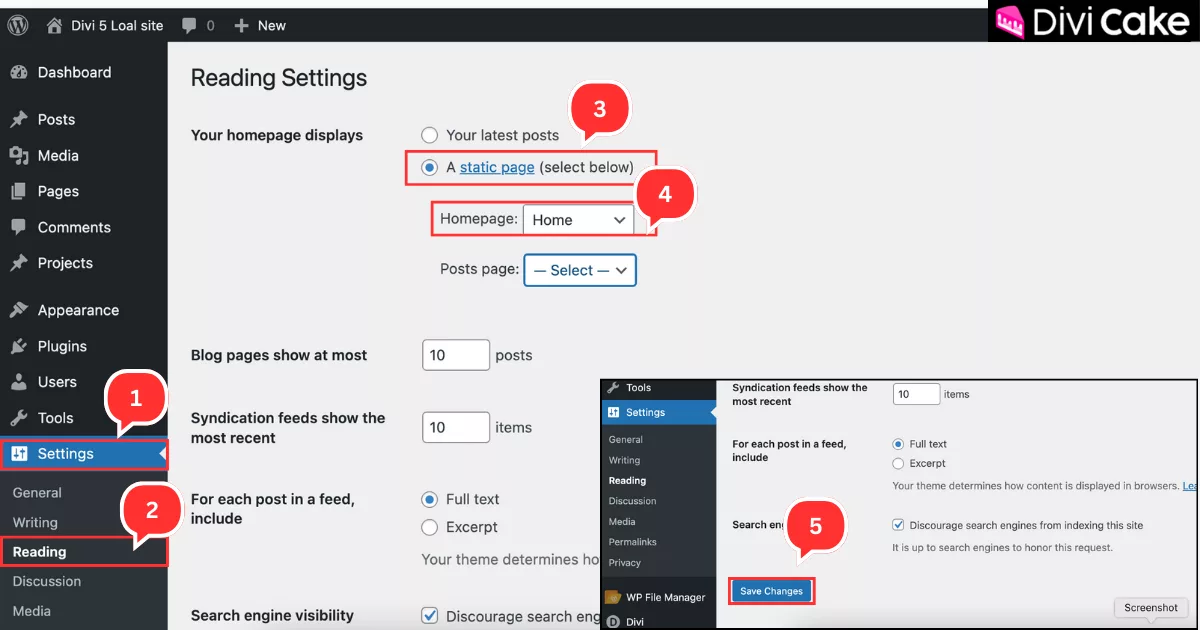
Follow these steps to set your custom Home page as the landing page:
- Open your WordPress Dashboard In the left-hand menu, click on Settings.
- Click on the Reading option.
- Select the A static page option.
- In the dropdown menu, select the Home page you designed (with Divi 5, Elementor, or any other builder).
- Scroll down and click the blue Save Changes button to apply the settings.
Conclusion
Setting your custom Home page as the landing page in WordPress ensures that visitors always see your best-designed page first, leaving a lasting impression. By using WordPress’s built-in settings, you can make this change quickly. Whether you’ve created your page with Divi, Elementor, or another builder, this simple adjustment makes your website more professional and user-friendly.Now that you know how to set a static page as your front page, you’re ready to take full control of your website’s design and user experience. A well-structured landing page not only improves navigation but also boosts engagement and conversions. Keep experimenting with creative layouts, and don’t forget to optimize your Home page for SEO so your site ranks higher in search results and attracts more visitors.
Read More: 9 Best Divi Landing Page Layouts


Submit a comment
Comments are read before they appear. Your email is not published.
Thanks. Your comment is waiting for review and will appear here once it is approved.