
Boost Conversions with These Free Divi Testimonial Sections from Divi Lover
We may earn a commission from affiliate links in this post. Disclosure policy
Do you want a professional-looking testimonial section that instantly builds trust and boosts conversions? With these free Divi testimonial sections from Divi Lover, you can easily enhance your website’s credibility without spending hours designing from scratch.
A well-designed Divi testimonial module does more than just display kind words from happy clients, it builds trust, increases engagement, and turns visitors into loyal customers. The best part is that Divi gives you unlimited design flexibility, allowing your testimonial layouts to match your site’s style perfectly.
To save you time and effort, we’ve selected three beautiful pre-made Divi Lover layouts that you can download for free. These sections are easy to customize, lightweight, and designed to fit seamlessly with your website’s branding.
In this tutorial, you’ll discover the best free Divi testimonial modules that help you create eye-catching, conversion-boosting testimonial sections in just a few minutes.
Why Testimonials are Your Secret Conversion Weapon
Testimonials are a powerful conversion weapon because they provide social proof, build trust, and increase authenticity, transforming buyer doubt into belief and leading to more sales. By displaying real customers’ positive experiences, testimonials provide potential buyers with a trustworthy endorsement that traditional marketing cannot replicate, proving your product or service delivers on its promise.
Meet Your New Free Testimonial Sections
Discover beautifully designed free Divi testimonial sections that help build trust and boost conversions. These ready-to-use layouts from Divi Lover make it easy to display client feedback and enhance your website’s professional look.
A Closer Look at the Free Divi Lover Testimonial Sections
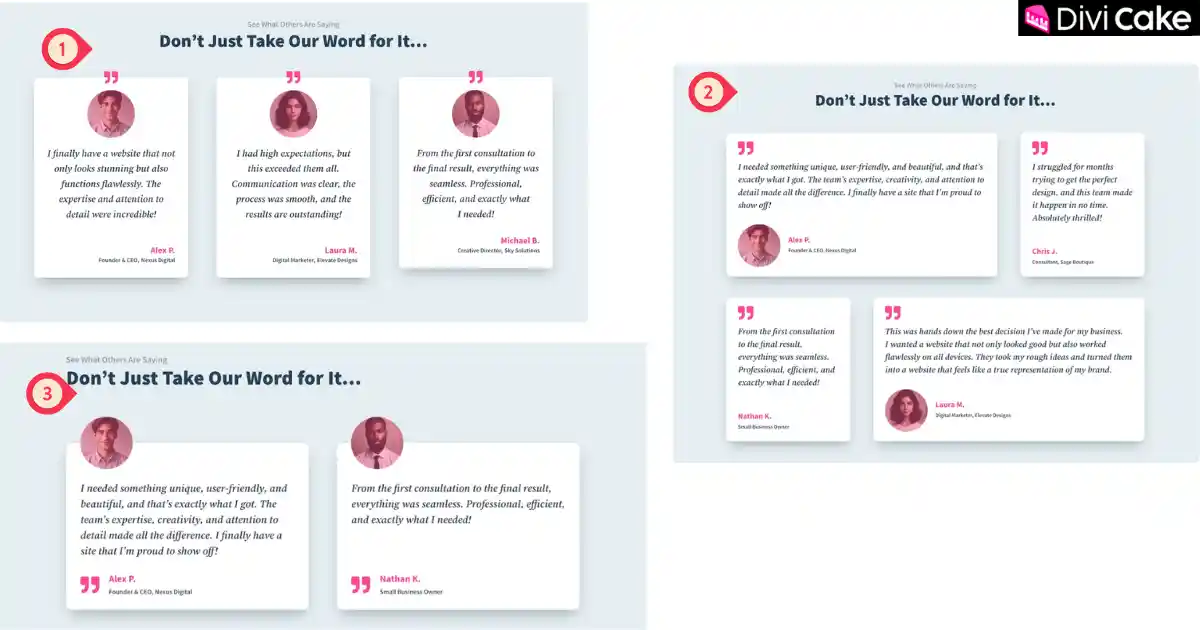
In the above screenshot, you can see the design and layout of the free Divi testimonial sections from Divi Lover. Each section is beautifully styled to match modern website trends and built to boost conversions with testimonials.
You can preview how each Divi testimonial module looks and choose the one that best fits your website’s style. Whether you prefer a clean, minimal layout or a bold, colorful one, these Divi Lover layouts make it easy to display client feedback and build strong Divi trust elements on your site.
1. Using the Standard Divi Testimonial Module (Quick & Easy)
The default Divi testimonial module is a quick and simple way to display client feedback on your website. You can easily apply your own styling and design tips to make it look great. However, this module offers limited customization options you can’t fully adjust the layout or control how each testimonial aligns.
Another common issue is that the testimonial boxes might not have equal heights, which can make the layout look uneven. But if you’re using Divi Toolbox, you’re in luck! This plugin includes a built-in feature that automatically equalizes testimonial heights, helping you achieve a clean and perfectly aligned design.
Using this method is ideal for beginners who want to add testimonials quickly without extra work, making it one of the best ways to boost conversions with testimonials while keeping things simple.
2. Using Columns for More Design Control
If you want full creative freedom over your Divi testimonial sections, try building them with columns instead of the default module. Each column can act as a separate testimonial card, giving you complete control over spacing, background colors, and typography.
This approach allows you to design free Divi testimonial sections that truly match your brand’s look and feel. By combining Divi trust elements like client names, photos, and reviews, you can create layouts that look professional and help boost credibility and conversions.
3. Mixing Both Methods for a Custom Look
Combine the Divi testimonial module and column layouts to get the best of both worlds. This method helps you design creative Divi Lover layouts that stand out and boost conversions with testimonials.
If you want a perfect balance between ease of use and creative freedom, try combining both approaches. Use the standard Divi testimonial module for its built-in structure and then place it inside custom columns to fine-tune your layout.
This hybrid method lets you achieve professional, responsive, and eye-catching testimonial sections without needing third-party plugins. With this setup, you can create Divi Lover-style layouts that highlight client trust, improve user engagement, and strengthen your brand’s credibility.
How to Import and Use These Sections (Step-by-Step Guide)
Step 1: Download the JSON File from Divi Lover
Downloading these free Divi testimonial sections from Divi Lover is very simple. If you’re new to Divi Lover, you’ll first need to subscribe to their newsletter to get download access. Don’t worry it’s quick, free, and only takes a few seconds.
If you face any issues while accessing or downloading the Divi Lover layouts, we’ve already covered the complete process in another detailed blog post. You can follow that guide for step-by-step instructions on downloading and importing Divi Lover Free Layout into Divi.
Follow these easy steps to get started:
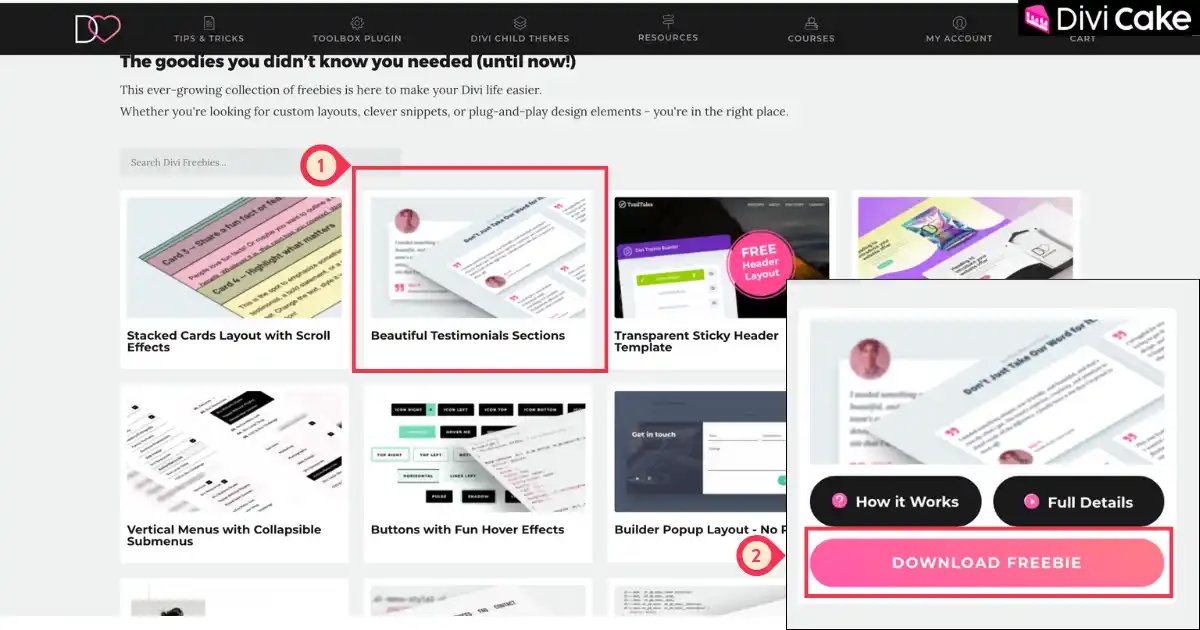
- Hover your mouse over the Beautiful Testimonial Sections (as shown in the screenshot below).
- Click on the Download Freebie button to start your download.
Note: When you download the free testimonial layout, it will come in a ZIP file format. Before importing it into Divi, make sure to unzip the file on your computer.
Step 2: Open the Divi Visual Builder
Once your free Divi testimonial sections are downloaded, it’s time to add the testimonial section to your website. Go to the page where you want to display these beautiful pre-made testimonial layouts.
Follow these steps:
- In your WordPress dashboard, click on Pages.
- Find the page where you want to add the testimonial section.
- Click Edit with Divi to open it in the Divi Theme Builder.
Step 3: Import the JSON file into your desired Page
We have selected our homepage to demonstrate how to import these sections. These testimonial modules come in section format, so whenever you want to add them, you’ll need to create a separate section for this purpose. Therefore, we’re going to show how to import these testimonial sections created by Divi Lover.
Follow this step:
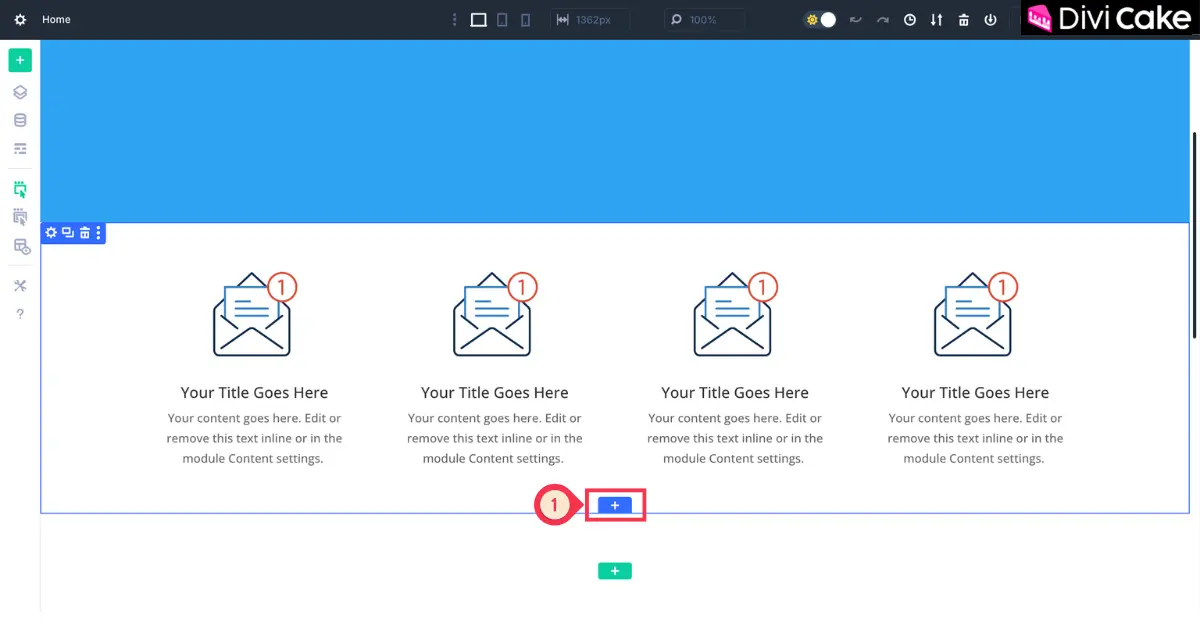
- Click on the Blue Color Plus Icon button it will create a new section.
Step 4: Add New Section
After opening your page in the Divi Visual Builder, click on the plus (+) icon to add a new section. You’ll see the Insert Section window appear (as shown in the screenshot below).
Instead of choosing “Insert New Section,” click on the Add From Library option this will open your Divi Library, where you can import your free Divi testimonial sections.
Follow these steps:
- Click on the Add From Library option.
- Click on the Choose File button to upload your layout file.
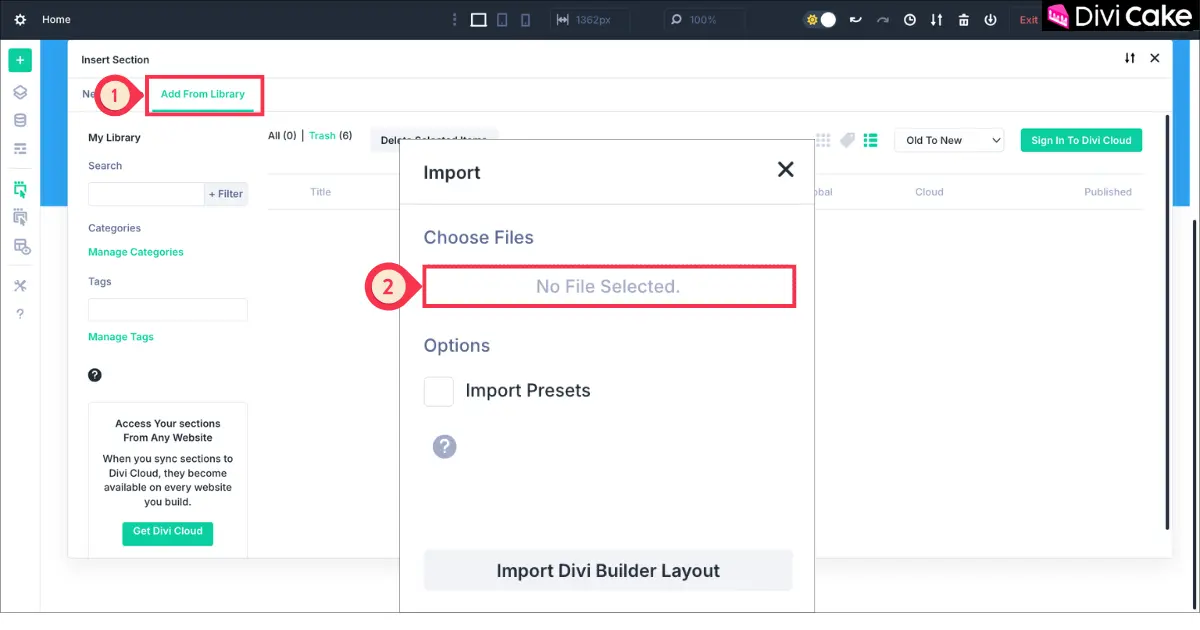
Step 5: Import the Testimonial Layout File
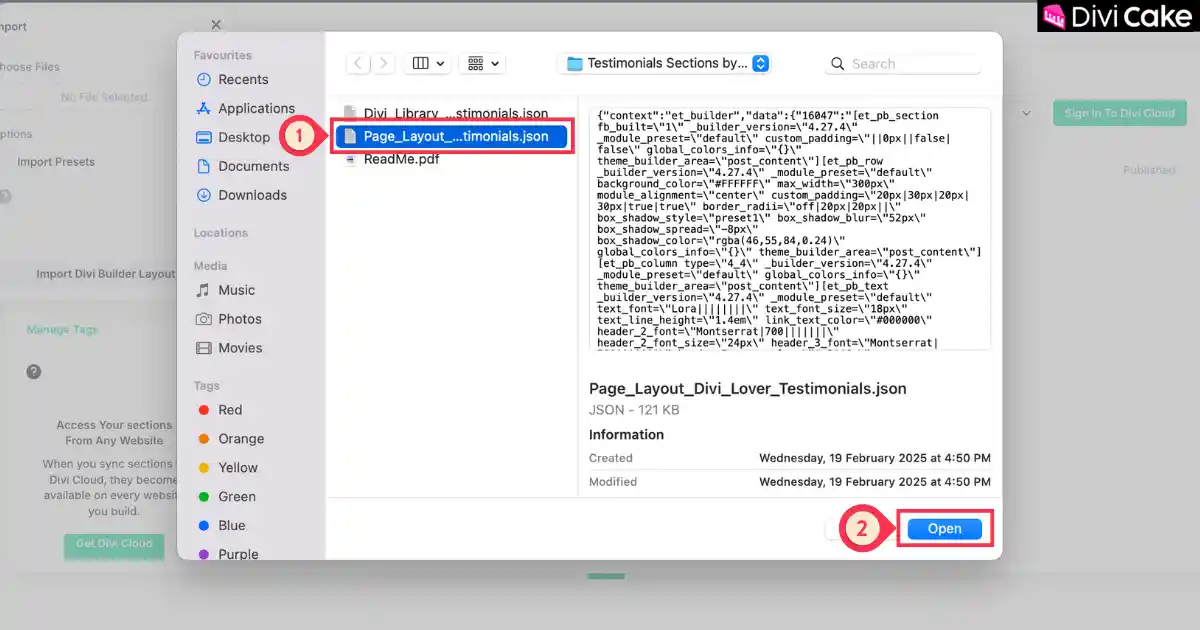
Once you click on Choose File, your computer’s storage will open. Navigate to the folder where you downloaded the Free Divi Testimonial Sections. Inside the Testimonial folder, you’ll find three files
Divi Library, Page_Layout_…testimonials.json, and ReadMe.pdf.
To import the layout into your website:
- Click on the Page_Layout_…testimonials.json file.
- Then click on the Open button to start the import process.
This will successfully upload the testimonial layout to your Divi Library, making it ready for use in your Divi Builder.
Step 5: Choose and Import Your Favorite Testimonial Section
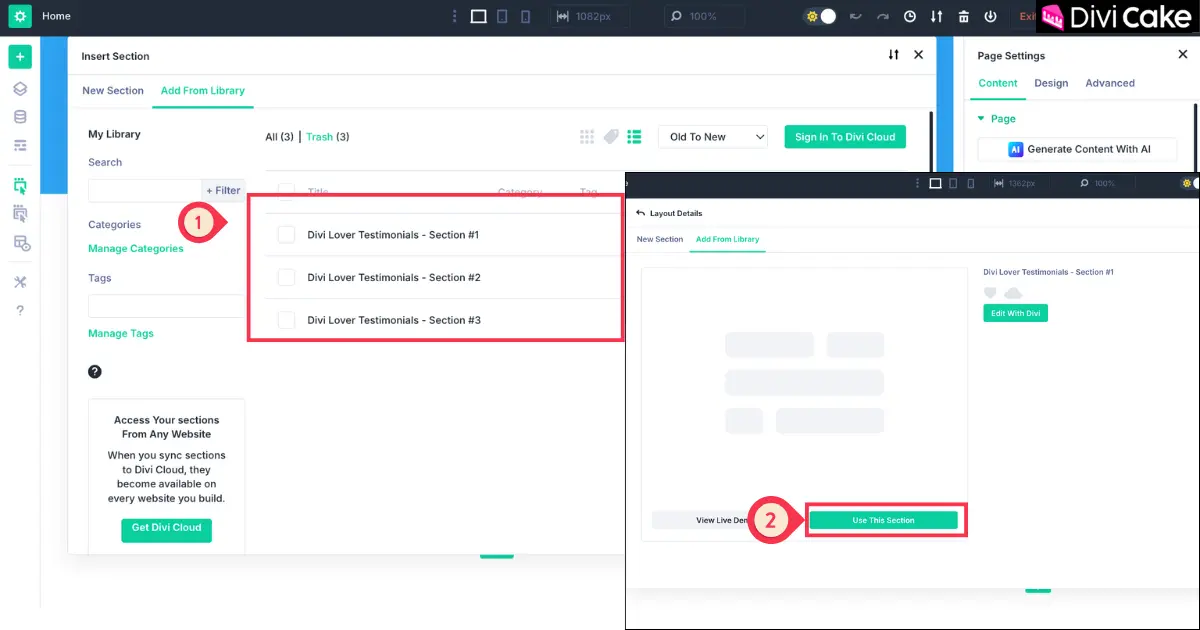
As shown in the image below, your Free Divi Testimonial Sections are now successfully uploaded. Now the choice is yours
select the testimonial style that best matches your website’s design and overall look. Each section is designed to help you boost conversions with testimonials and build trust with your visitors.
- Select one of the sections as shown in the below screenshot.
Learn More: Top 12 Divi Testimonial Sliders in 2024: Display Reviews in a Creative Style
Final Result
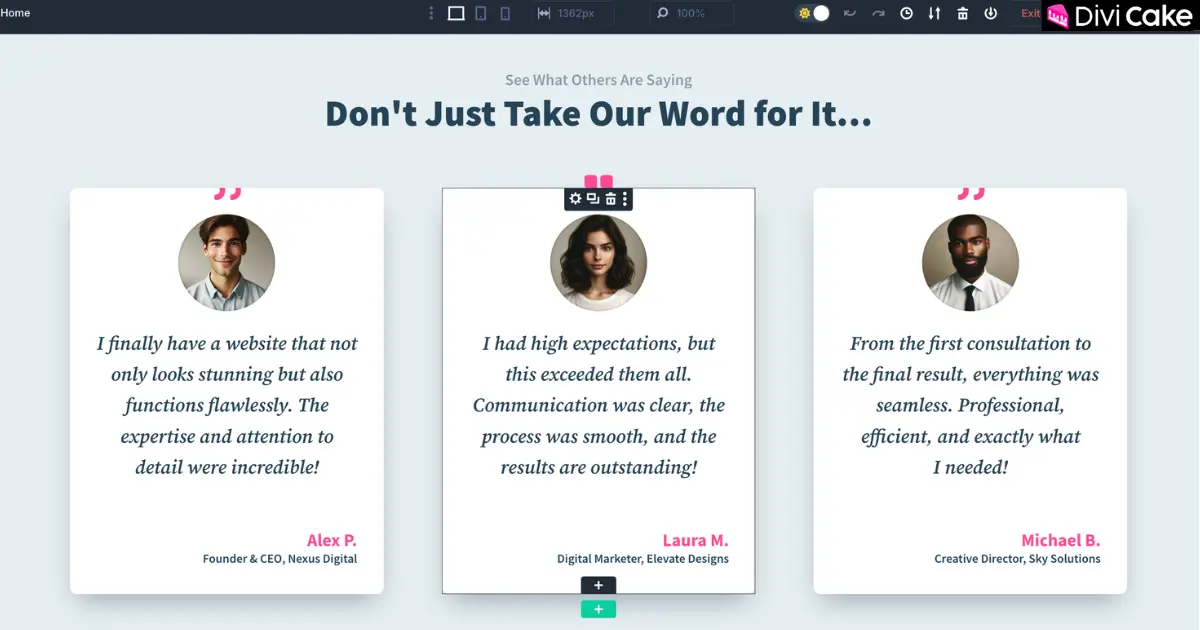
The screenshot below shows the final outcome after successfully downloading, importing, and adding the testimonial section to the desired page. This confirms that the Free Divi Testimonial Sections from Divi Lover have been properly installed and are now live on our website giving it a more professional and trustworthy look.
Conclusion
In today’s competitive digital world, building trust with your audience is one of the most powerful ways to increase engagement and drive conversions. Adding social proof through testimonials helps potential customers see the real experiences of others who have benefited from your services or products. With Divi, creating stunning testimonial sections doesn’t have to be time-consuming and thanks to Divi Lover’s free testimonial layouts, you can achieve a professional and persuasive design effortlessly.
These free Divi testimonial sections are beautifully crafted to fit seamlessly into any website style. Whether you’re using the standard Divi Testimonial Module or customizing layouts for more creative control, these pre-made designs save time while maintaining a premium look. You can import them directly into your Divi Theme Builder and start customizing instantly no coding, no complex setup, just easy drag-and-drop editing.
If you’re ready to take your website to the next level, download your free Divi testimonial sections from Divi Lover today and start displaying your clients’ stories in style. By displaying honest, well-presented feedback, you’ll not only boost conversions but also build lasting trust with your visitors.
Which testimonial layout do you like the most? Let us know in the comments below!

Submit a comment
Comments are read before they appear. Your email is not published.
Thanks. Your comment is waiting for review and will appear here once it is approved.