
Kinsta vs Elementor Hosting: Which Is Better for WordPress and Elementor Sites
We may earn a commission from affiliate links in this post. Disclosure policy
Choosing the best hosting for your Elementor website is one of the most important decisions you’ll make when building your site. The choice usually comes down to two top contenders Kinsta and Elementor Hosting. Both offer excellent speed, security, and performance, but each has unique advantages depending on your needs. In this article, we’ll give you a clear and detailed comparison of Kinsta vs Elementor Hosting, covering performance, pricing, features, and ease of use. Whether you’re creating a new website or planning to switch hosting providers, this guide will help you choose the best hosting for your Elementor site with confidence.
What Exactly Are We Comparing?
It’s crucial to understand that Kinsta and Elementor hosting are fundamentally different products. Elementor is, first and foremost, a powerful page builder. Elementor hosting is a hosting service built around that page builder, offering an all in one solution designed for simplicity and deep integration with Elementor. It’s a curated hosting environment meant to remove the guesswork for users who primarily build websites with this tool. On the other hand, Kinsta is a specialized managed WordPress host. It doesn’t make a page builder; instead, it provides a premium, high performance server infrastructure that is optimized for Elementor and any other WordPress plugin or theme. The core of the Kinsta vs Elementor hosting debate is whether you prioritize a seamless, builder centric experience or a robust, general purpose managed WordPress powerhouse.
The distinction is key to the vs Elementor hosting discussion. When you choose Elementor hosting, you are buying into an ecosystem. The hosting provider is the same company that makes the page builder you love. This often translates to a deeply integrated workflow. Conversely, when you choose Kinsta, you are selecting a hosting partner renowned in the web hosting industry for its speed, security, and scalability across the entire WordPress platform. This kinsta vs elementor hosting comparison will explore which of these philosophies better serves different types of Elementor users.
Kinsta vs Elementor Hosting: A High Level Overview
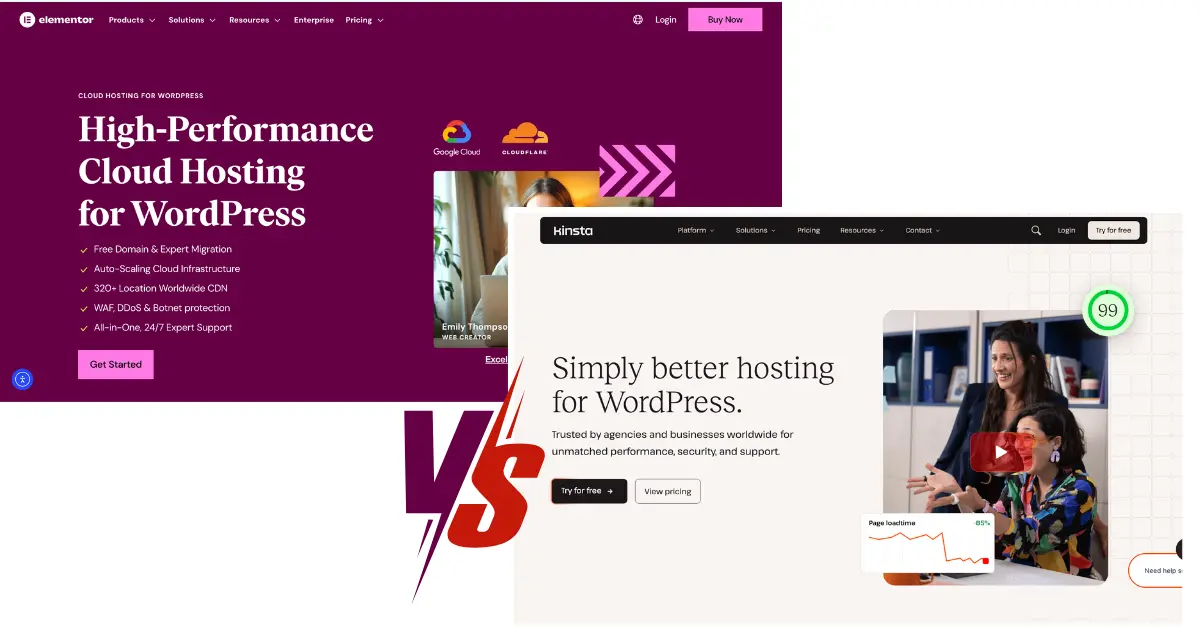
Elementor hosting provides an all in one solution for WordPress websites that are built with its builder. It’s designed to be the simplest path from signing up to launching a site built with Elementor. The platform is managed, meaning it handles technical aspects like server setup and caching. Elementor hosting includes features like a dedicated staging environment that integrates directly with the Elementor editor, Cloudflare CDN, and of course, a license for Elementor Pro on most plans. This tight integration aims to create a frictionless experience for designers and marketers who want to focus on creating without managing various hosting types.
Kinsta, in the vs Elementor hosting context, represents a different class of premium managed WordPress hosting. It doesn’t bundle a page builder but instead focuses on delivering an unparalleled hosting experience on a top tier infrastructure. Kinsta utilizes the Google Cloud Platform’s premium tier network, ensuring lightning fast load times globally. Its managed WordPress environment optimized for speed and security benefits any WordPress site, but it’s particularly effective for resource heavy pages created with Elementor. While it lacks the native builder integration, its performance oriented approach makes it a fierce competitor in the kinsta vs elementor hosting arena, especially for businesses where speed directly impacts revenue.
Ease of Use: Which Hosting Plan is Simpler for Beginners?
For a newcomer, the appeal of Elementor hosting is undeniable. The onboarding process is streamlined for someone who wants to use Elementor. You get a pre configured environment where the Elementor page builder is the star of the show. The dashboard is often simplified, and access to the Elementor Pro features is built directly into your hosting account and WordPress admin. This reduces the cognitive load of managing separate subscriptions for your page builder and your hosting provider. The staging site feature is also integrated within the Elementor interface, making it very easy to test designs before pushing them live.
Kinsta, while also a managed hosting service, presents a more comprehensive custom dashboard called MyKinsta.
This dashboard is incredibly powerful and provides deep insights into your site’s performance, resource usage, and security. For a beginner, it might have a slightly steeper learning curve than the simplified Elementor hosting dashboard. However, MyKinsta is renowned for its intuitive design and clarity. It centralizes management for everything from hosting firewall rules and backups to CDN and analytics. So, while it may not be as singularly focused on the Elementor workflow, its ease of use for general site management is top-notch, making tasks like hosting migration or creating a staging site straightforward.
Performance Face Off: Which is Faster for an Elementor Site?
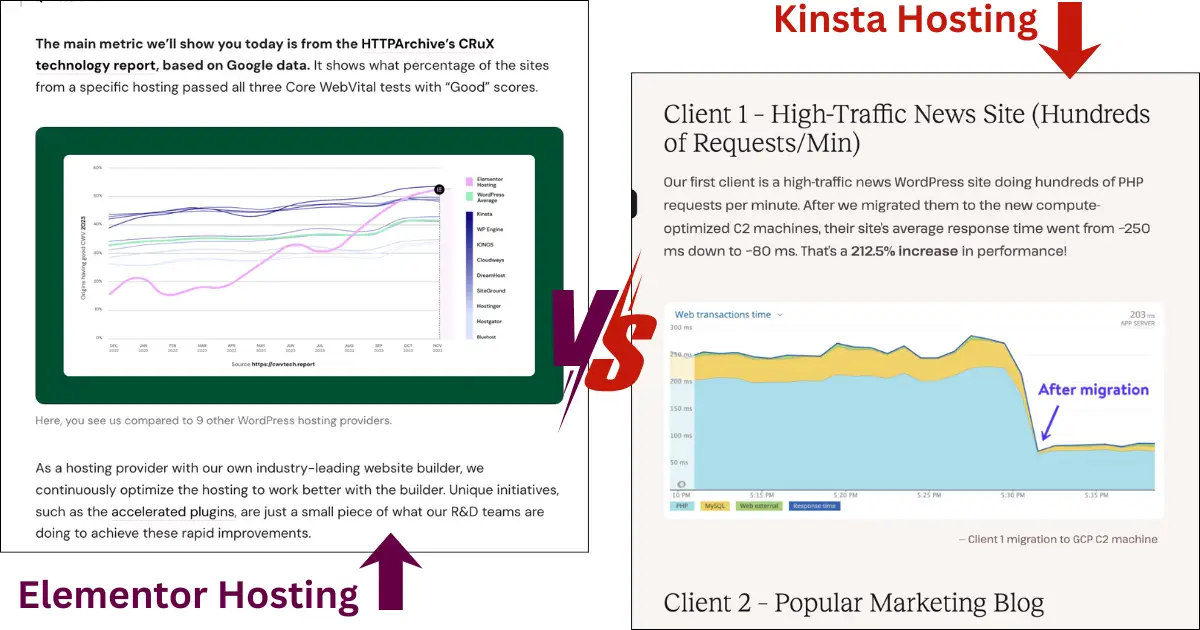
Performance is where the kinsta vs elementor hosting debate gets intense. Elementor hosting is built on a solid, cloud based infrastructure and includes server level caching and a built in Cloudflare CDN. It is undoubtedly fast and a significant upgrade from shared hosting. Because the environment is optimized for Elementor, the team can fine tune the server software and caching to work perfectly with the Elementor core, ensuring that the CSS, fonts, and other assets load efficiently. For most websites with Elementor, this provides an excellent, speedy experience that will satisfy visitors and Google’s Core Web Vitals.
However, Kinsta often takes the lead in raw performance benchmarks. Its use of the Google Cloud Platform’s premium tier network and its highly tuned, containerized LXD hosting stack is engineered for maximum speed and isolation. Every WordPress site on Kinsta runs in its own isolated container, meaning your site’s performance is never impacted by a “noisy neighbor.” Kinsta also offers multiple caching layers, including its own sophisticated Object Caching for dynamic content and a full page caching solution. When you combine this raw power with a global CDN, the site performance on new hosting from Kinsta is often exceptional, making it ideal for high traffic, high value Elementor sites where every millisecond counts.
Read More: Is Kinsta Worth It? 7 Key Reasons — Performance, Pricing & Features Explained
Security Showdown: How Do They Protect Your WordPress Website?
Security is a non-negotiable aspect of any hosting plan. Elementor hosting provides robust essential web hosting security measures. This includes a free SSL certificate for every site, DDoS protection, and regular malware scanning. As a managed WordPress host, it handles core WordPress updates automatically, reducing vulnerabilities. The platform is secured at the server level, and its close integration with the Elementor plugin means that security patches for the builder can be deployed swiftly across the hosting environment, creating a cohesive security posture.
Kinsta takes a famously proactive and robust approach to security. It offers a comprehensive suite of features, starting with a free SSL certificate and powerful, customizable hosting firewall rules. Kinsta actively monitors all sites for hacks and DDoS attacks, and its expert support team will help mitigate issues if they arise. A key differentiator is Kinsta’s isolated container technology, which not only boosts performance but also contains potential security breaches. If one site on their network were compromised, it couldn’t spread to others. Furthermore, Kinsta offers easy to configure web hosting security measures like two factor authentication for the MyKinsta dashboard and the ability to force SSL connections. For businesses, this enterprise grade security foundation is a massive advantage in the kinsta vs elementor hosting comparison.
Read More: Major WordPress Risks & How to Stay Protected
Customer Support: Who Offers Better Expert Support?
The quality of customer support can make or break your hosting experience. Elementor hosting’s major advantage is that its support team consists of WordPress experts who are also specialists in the Elementor page builder. If you have an issue that blurs the line between a hosting problem and a design problem within Elementor, they are uniquely positioned to help. This deep product knowledge is invaluable for users who are deeply embedded in the Elementor ecosystem and want a single point of contact for their site-related queries.
Kinsta’s support team is also composed entirely of WordPress experts, but their expertise is broader and deeper in server management, performance optimization, and security. They may not be able to tell you how to achieve a specific design in the Elementor builder, but they are unparalleled at solving complex hosting, caching, and server related challenges. Kinsta provides 24/7 support via live chat, and many users report fast, knowledgeable, and effective interactions. The Kinsta help center is also a vast repository of detailed tutorials and documentation. In the context of vs Elementor hosting, if you need help with the hosting part of your site, Kinsta’s expert support is widely considered among the best in the industry.
Pricing and Value: Which Hosting Solution Offers More?
Elementor hosting bundles the cost of your hosting plan with a license for Elementor Pro. When you factor in the price of Elementor Pro separately, the bundled cost can represent good value, especially for freelancers or small agencies who need both. The entry level plans are competitively priced for the features offered, making it an accessible all in one solution for WordPress websites built with their tool. It simplifies billing and ensures you’re always on a compatible, optimized platform.
Kinsta’s pricing is positioned in the premium managed WordPress hosting segment. It does not include an Elementor Pro license, so that cost must be added on top. However, for its price, Kinsta delivers a significantly more powerful and scalable infrastructure, superior performance, and more advanced developer tools. The value proposition is different: you are paying for top tier hardware, unparalleled security, and a feature set designed for business critical sites. When conducting a kinsta vs elementor hosting cost analysis, you must decide if the value lies in the convenience of a bundled builder or the raw power and scalability of a world class managed WordPress host like Kinsta.
Key Factors for a Smooth Hosting Migration
Migrating your Elementor site to a new host can feel daunting, but both services aim to simplify this process. Elementor hosting provides a dedicated migration plugin that is designed to work seamlessly with sites built with Elementor. This can be a major selling point, as it reduces the risk of compatibility issues during the move. The process is geared towards their own user base, ensuring that the unique aspects of an Elementor created site are transferred correctly.
Kinsta also excels in this area. They offer free migration services for most sites, handled by their expert support team. This is a huge benefit, as it takes the technical burden completely off your shoulders. You simply submit a request, and the Kinsta team will handle the entire hosting migration for you. For complex sites or those moving from a problematic host, this white glove service is invaluable. It ensures a smooth transition with minimal downtime, which is a critical factor for smooth hosting migration for any business.
Selecting the Best Hosting Plan for Your Needs
So, how do you go about selecting the best hosting plan? Your choice in the kinsta vs elementor hosting debate depends entirely on your priorities. If your primary goal is the simplest possible workflow for creating and managing a website with Elementor, and you value having your page builder and hosting under one roof with integrated support, then Elementor hosting is an excellent choice. It removes friction and is ideal for freelancers, small business owners, and marketers.
If your priority is maximizing site speed, ensuring enterprise grade security, and having a hosting platform that can scale with your business’s growth, then Kinsta is the superior choice. It is the better option for developers, agencies, and online stores where performance and reliability directly impact the bottom line. Select a hosting partner that aligns with your long-term goals. Consider not just your current needs, but where you want your WordPress website to be in a year or two.
Learn More: How to Choose Your Hosting Smartly
The Future of Hosting: What’s Next for the Web Hosting Industry?
The web hosting industry is constantly evolving. The future of hosting points towards even greater integration, performance, and a focus on sustainability. We see this already with solutions like Elementor hosting, which integrates a specific tool deeply into the stack. The future of hosting will likely see more of these curated, application specific solutions. Similarly, the performance bar will continue to rise, with providers like Kinsta leveraging the latest upcoming hosting technologies like edge computing and more advanced caching mechanisms.
Another key trend is the rise of green energy hosting servers. Kinsta, for example, runs on Google Cloud Platform, which has been carbon neutral since 2007 and aims to run on carbon free energy 24/7. As environmental concerns grow, this will become a standard expectation. The next for the web hosting world is also likely to involve more AI driven optimizations for performance and security. Ultimately, hosting isn’t just about server space anymore; it’s about providing a smart, efficient, and responsible platform for the digital future.
Which One Should You Actually Choose?
Think of it this way: Go with Elementor Hosting for a seamless, all-in-one experience. It’s perfect if you want to focus purely on design and want your page builder and hosting to work together effortlessly.
Choose Kinsta for maximum power and performance. It’s the winner for growing businesses where speed, security, and scalability are non-negotiable.
Ultimately, your choice is simple:
If you want the easiest creative workflow? Pick Elementor Hosting and If you need a high-performance business engine? Pick Kinsta.
Both will give your WordPress Elementor site a great home; it just depends on what you value most.
Learn More: The Fastest WordPress Host for Your Online Store


Submit a comment
Comments are read before they appear. Your email is not published.
Thanks. Your comment is waiting for review and will appear here once it is approved.