
Kinsta Hosting Review 2025: Is It Still the Best Managed WordPress Host?
We may earn a commission from affiliate links in this post. Disclosure policy
Over the years, Kinsta has built a strong reputation among WordPress professionals for its speed-focused architecture, reliable security measures, and responsive customer service. Heading into 2025, it’s clear that Kinsta isn’t coasting on past success. The company has continued to roll out infrastructure improvements, now powered by Google Cloud’s Premium Tier network and upgraded to newer-generation C2 and C3 VMs for even better performance under load.
Kinsta’s Evolving Infrastructure and Performance in 2025
In this Kinsta Hosting Review 2025, we take a closer look at how the platform holds up today based on our own experience running real-world WordPress sites. We also dig into tools for developers and site admins, security protocols, support response quality, pricing structure, and how the platform scales with traffic spikes or growing resource needs.
The aim here is simple: to find out if Kinsta still delivers the kind of managed WordPress hosting that justifies its premium price tag or are there better options out there? Let’s break it all down.
Hosting Architecture & Technology
Kinsta’s infrastructure is designed with performance, scalability, and reliability in mind. Here’s a breakdown of what powers their platform under the hood:
Powered by Google Cloud Platform

Built on Google Cloud for Fast, Secure, and Scalable Hosting
- Built on Google Cloud’s Premium Tier network for low latency and high uptime.
- Each site runs in an isolated container with dedicated resources (PHP, Nginx, MySQL/MariaDB).
- Container-based hosting enhances site security and resource efficiency.
Global Data Center Network
- 37+ data center locations worldwide for better proximity to visitors.
- Host your site in key regions like Los Angeles, London, Tokyo, Frankfurt, Sydney, and more.
Latest Google Hardware (C2 & C3D)

Powered by Latest Google C2 and C3D Compute Instances
- Utilizes next-gen C2 and C3D VMs, optimized for high-performance workloads.
- Improved single-core performance means faster page generation, even under load.
- No extra cost for newer compute instances.
Optimized Web Stack for WordPress
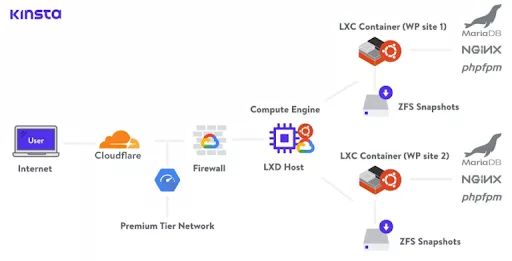
Modern LEMP Stack Architecture at Kinsta
- Built on a modern LEMP stack: Linux, Nginx, MariaDB, PHP.
- Nginx is configured for high concurrency and fast static file delivery.
- MariaDB fine-tuned for faster query handling during traffic spikes.
Support for Modern Protocols
- HTTP/3 enabled by default, improving browser connection speed.
- Always running up-to-date PHP versions (PHP 8.x as of 2025).
- Easy switching between PHP versions for compatibility.
Built-In Server-Level Caching
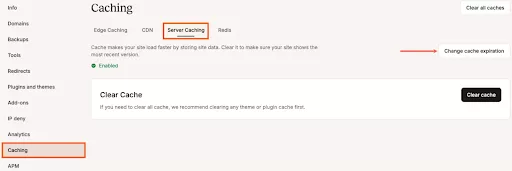
Title: Built-In Server-Level Caching Features in Kinsta Hosting
- Full-page caching integrated no plugins needed.
- Redis object caching available on higher-tier plans.
- Database query caching reduces load and improves response time.
Global CDN and Edge Caching
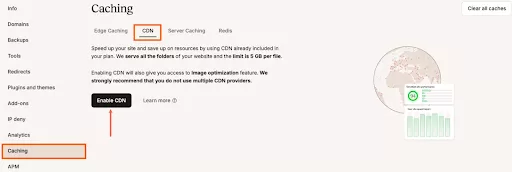
Kinsta CDN and Edge Caching Features for Faster Global Delivery
- Free Cloudflare CDN with 260+ Points of Presence.
- Static content delivered from the nearest location for lower TTFB.
- Optional Edge Caching stores full pages at edge nodes for high-speed delivery.
Kinsta’s hosting architecture and technology stack combine premium hardware, global coverage, and deep WordPress-specific optimization. This ensures that performance stays consistent whether your site gets 100 or 100,000 visitors a day.
Read More: How to Choose Your Hosting Smartly
Developer Tools and Platform Features
Kinsta does more than just host your site it gives developers the tools they need to work fast and stay in control. Whether you’re managing one project or dozens, the platform includes a full suite of features that support modern workflows without getting in the way.
MyKinsta Dashboard
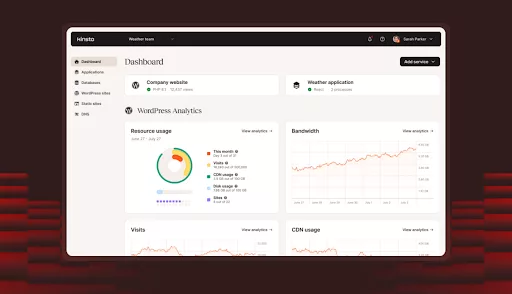
MyKinsta Dashboard Overview for Easy Site Management
Kinsta skips cPanel entirely and replaces it with its own custom dashboard: MyKinsta. This interface is clean, responsive, and built with real-world workflows in mind. You can manage site settings, review analytics, and create or delete environments from one place. Adding a new site takes just a few steps select a data center, fill out the details, and let Kinsta handle the setup. It even offers to pre-install WordPress, WooCommerce, or tools like Yoast SEO during the process.
One-Click Staging and Cloning
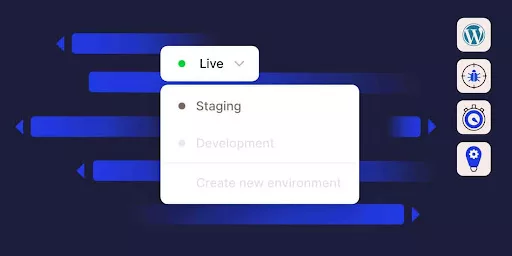
One-Click Staging and Cloning in Kinsta Hosting
Kinsta plans include staging and cloning tools by default. Spinning up a staging environment takes seconds, giving you a sandbox to safely test updates or changes. When you’re ready, you can push those changes live with a single click.
SSH and Git Access
Developers get full SSH access to each site’s container. Git repositories are built into each site as well, making it easy to push changes directly from your local machine. If you’re used to working from the command line, this setup makes deployments quick and friction-free.
WP-CLI Support
Kinsta fully supports WP-CLI out of the box. That means you can run updates, manage users, reset passwords, or clean up the database straight from the terminal. In our case, we handled plugin and theme updates across multiple environments with just one command no need to click through the WordPress dashboard.
PHP Version Switching
Need to test compatibility with a specific PHP version? You can switch PHP versions inside MyKinsta with a single click. The latest versions are always available, so you can stay current or roll back temporarily if a plugin requires it.
Built-In APM Tool
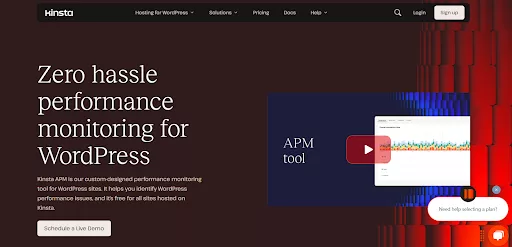
Built-In Application Performance Monitoring (APM) Tool in Kinsta
Kinsta includes its own Application Performance Monitoring tool no need for third-party add-ons like New Relic. It gives you visibility into what’s slowing down your site, whether it’s a plugin, theme, or database query.
Free Managed Migrations
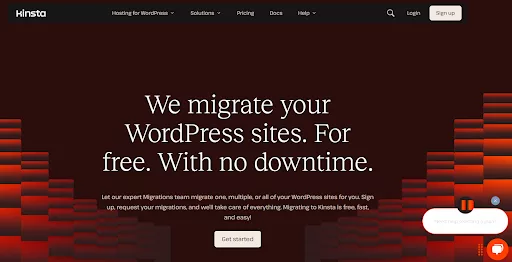
Free Managed Website Migrations with Kinsta
If you’re moving from another provider, Kinsta offers free migrations for all sites, regardless of plan. You can request a migration directly from the dashboard, and their team handles the rest no downtime, no missing files, and everything is reconfigured properly. It’s a smooth process that saves hours of manual effort.
Auto Updates and Backups
For added peace of mind, Kinsta offers automatic updates for plugins and themes (available as an add-on). Daily backups are included with every plan and retained for up to 30 days. You can restore from a backup with one click ideal if something breaks after an update.
Kinsta’s developer tools and platform features are built for speed, efficiency, and flexibility. If you’re a solo developer or working with a team, it removes the friction from day-to-day tasks while giving you full control over your environment. It’s not just about hosting it’s about making development smoother from start to finish.
Read More: How to Backup Your Divi/WordPress Site
Security & Reliability
Kinsta takes website security seriously, building it into every part of its hosting platform. From infrastructure to daily operations, the entire setup is designed to keep your data safe and your site running smoothly.
Infrastructure Built for Safety
Kinsta uses a certified cloud architecture with ISO 27001, 27017, and 27018 compliance, which aligns with some of the strictest global standards for data security. Their systems follow a zero-trust framework nothing has access unless it’s explicitly granted. This means if one site faces a threat, it doesn’t spread to others. Everything is tightly locked down behind the scenes.
Cloudflare Is Included

Built-In Cloudflare Integration for Enhanced Site Protection
Every site hosted with Kinsta benefits from built-in Cloudflare integration. This adds an extra layer of protection at no extra cost. Your site is protected against DDoS attacks, bot traffic, and other malicious requests before they even reach your server. Cloudflare’s edge network filters out the bad traffic automatically, helping your site stay online even during suspicious spikes in activity.
Hands-On Security Controls
Kinsta gives you the option to manage your own firewall rules directly inside the MyKinsta dashboard. You can block unwanted IPs, restrict access by country, or limit login attempts to keep your site under control. These settings give you the flexibility to respond quickly if anything looks off.
Backup and Monitoring Tools
Automatic daily backups come standard, and you can create manual backups any time you’re planning a change. Backups are kept for 30 days, and restoring one is fast and easy. On top of that, Kinsta checks your site’s uptime every three minutes. If something crashes, you and their support team are alerted right away.
Read More: 10 Best WordPress Site Monitoring Tools in 2024
Account Security Features
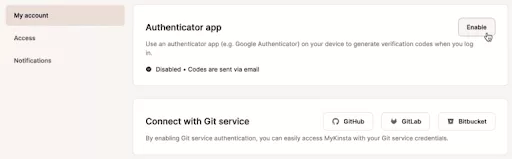
Kinsta Account Security Features Overview
Your Kinsta account can be locked down with two-factor authentication (2FA), and the system tracks all account activity. Multiple failed login attempts result in an automatic lockout, which helps prevent brute-force attacks and keeps unauthorized users out.
Read More: Divi Security in 2025: Major WordPress Risks & How to Stay Protected
Free Malware Removal
If your site ever gets infected, Kinsta’s team will clean it up at no charge. This is part of their hosting promise, and while you hope to never need it, it’s good to know that expert help is included if things go south.
With all of these layers in place, Kinsta offers a secure and stable hosting experience. While you’re running a WooCommerce store or a business site, Kinsta provides the kind of peace of mind most hosts can’t match.
Customer Support and Service
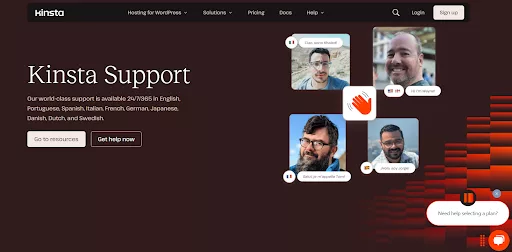
Top-Tier Customer Support with Kinsta Hosting
Kinsta’s provide 24/7/365 live chat support on every plan. Notable aspects of Kinsta support:
- Multilingual 24/7 Chat: Kinsta’s team supports customers in 10+ languages.
- WP-Focused Experts: The support staff are all WordPress-savvy (not generic hosting reps). They can often answer plugin or theme-specific questions.
- Proactive Monitoring: Kinsta’s team actively monitors your sites. If a site starts to have errors or traffic drops, Kinsta sometimes alerts the owner before they notice.
- Accessible Documentation: Kinsta maintains an extensive knowledge base with tutorials, best-practices, and troubleshooting tips.
Overall, Kinsta’s support and operational transparency are top-tier, matching the premium price. It reinforces why Kinsta has a reputation for “excellent customer service”.
Pricing and Plans
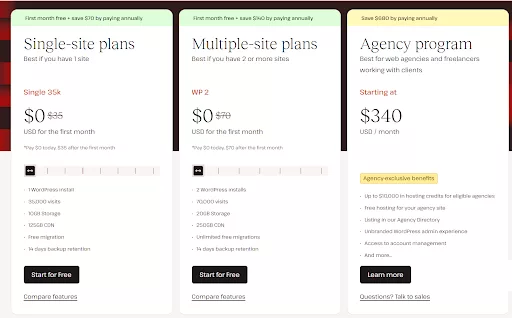
Kinsta Hosting Pricing Plans Breakdown (2025)
Kinsta is positioned as a premium product, and its pricing reflects that. Plans start at $35/month for a single-site Business-1 plan. Here’s a quick overview of their entry-level tiers (single site plans):
- Starter (Micro): $35/month – 1 WordPress install, 25,000 visits/month, 10 GB storage, free CDN (125 GB).
- Pro (Small): $50/month – 1 install, 50,000 visits, 10 GB storage, free CDN (250 GB).
- Business-1: $90/month – 1 install, 100,000 visits, 10 GB storage, free CDN (500 GB).
Each higher tier increases the visits quota, storage, and CDN included. They also offer multi-site plans (starting $70/month for 2 sites) and agency/enterprise plans (hundreds of sites and millions of visits). Agency plans (20, 40, 60 sites) start at $340/month with large traffic allowances.
All plans include:
- Free Cloudflare CDN (with a generous GB included),
- SSL certificates and PHP version switching,
- Daily backups and staging environments,
- 24/7 support
- Google Cloud premium hardware.
Given these specs, Kinsta’s pricing is higher than basic shared or even most managed hosts. However, consider the value: you’re paying for dedicated container resources, elite hardware, and all the features listed above. So, “you get what you pay for”. Also, Kinsta offers a 30-day money-back guarantee, so you can try before fully committing.
If you’re interested, check Kinsta’s latest plans here. Through our partnership link, readers may get an exclusive signup bonus or discounted first month (if available).
Scalability & Use Cases
One of Kinsta’s selling points is that it can scale with your site’s growth. Thanks to containerization and Google Cloud, scaling up often just means upgrading to a higher plan – your site moves seamlessly to more powerful containers.
-
Traffic Surges: Because Kinsta containers run on Google’s load-balanced platform, short traffic spikes are automatically absorbed (to the plan’s limit). For very sudden surges (e.g. viral posts), Edge Caching can dramatically smooth the traffic load.
-
Growing Businesses: Many users of Kinsta are e-commerce stores, SaaS sites, and agencies. These use cases demand stability and scaling. Kinsta’s higher-tier plans can handle hundreds of thousands to millions of monthly visits (e.g. Agency plan allows 1.25M+ visits.
-
Global Reach: With its massive global footprint, Kinsta can support sites targeting international audiences. Content is served from local data centers/CDN nodes, reducing lag. This is a huge advantage over domestic-only hosts.
-
High-Traffic Media & Enterprise: The Google Cloud underpinnings mean Kinsta can scale up to handle really high loads (billions of requests, multi-million users). For companies, Kinsta can dedicate special enterprise solutions (e.g. private clusters) beyond the standard plans.
In practice, if your traffic or business needs to outgrow one container, you simply upgrade plans. No site migration or downtime is needed – Kinsta moves you to a larger container on a faster VM.
Given this, Kinsta is ideal for:
- Growing Blogs/Businesses that want performance headroom.
- E-commerce and Membership Sites (which need stability and speed for conversions).
- Digital Agencies managing multiple client sites (their dashboard supports dozens of sites cleanly).
- High-Scale Apps built on WordPress or headless WordPress front-ends (the underlying infrastructure can handle custom workloads).
Kinsta Pros and Cons
Kinsta brings a lot to the table, especially for users who prioritize performance, security, and developer tools. However, like any hosting provider, it’s not a one-size-fits-all solution. Below, we’ve broken down the key pros and cons to help you decide whether Kinsta is the right fit for your website or project.
Pros of Kinsta:
- Outstanding Performance: Powered by Google Cloud (C2/C3), extensive caching, and 260+ PoP CDN.
- Strong Security: ISO-certified, Cloudflare DDoS/firewall, free SSL, 2FA, malware guarantees.
- Developer-Friendly: SSH, Git, WP-CLI, staging/cloning, built-in APM.
- Easy-to-Use Dashboard: Modern MyKinsta UI with one-click staging, analytics, and simplified management.
- Reliable Uptime: 99.9% SLA, proactive monitoring (480 checks/day).
- 24/7 Expert Support: Fast live chat with WordPress experts (multi-language, <2min response).
- Managed Migrations: Free professional migrations, plus auto backups and restore.
- Global Infrastructure: 37+ data centers and CDN for worldwide fast reach.
- Fully Managed: Server maintenance, security, and scalability handled by Kinsta. You focus on your site/app.
Cons of Kinsta:
- Higher Cost: Premium pricing (entry at $35/month) may be steep for hobby sites.
- No Email Hosting: Kinsta focuses on hosting; you’ll need external email (common for managed WP hosts).
- WP/PHP Only: Not for non-WordPress sites or custom stacks (e.g. Ruby, Node). PHP-based CMS and frameworks only.
- Less Low-Level Control: No root/server-level access (by design), which some sysadmins may miss.
- Resource Limits: Overage fees apply if visits or resources exceed plan allowances. Planning is needed for traffic surges.
- No Freebies: Unlike some hosts, Kinsta doesn’t bundle free SEO tools or site builders (focus is solely on performance).
Final Thoughts
After thorough analysis, Kinsta remains a top contender for managed WordPress hosting in 2025. Its powerful Google Cloud foundation (with C2/C3 machines and containerized architecture) yields blazing speeds and rock-solid reliability. Every aspect – from the high-performance LEMP stack to the free Cloudflare CDN – is engineered for maximum throughput and uptime (backed by a 99.9% SLA).
From a developer and admin perspective, Kinsta offers an impressive toolbox (SSH, Git, staging, APM, and more) combined with an intuitive dashboard. Security measures (ISO certification, DDoS protection, constant monitoring) provide real peace of mind. Support is responsive and expert-level, and migrating to Kinsta is hassle-free with their in-house team.
Of course, this level of service comes at a premium price. Kinsta is not the cheapest option, but if you value speed, security, and expert support, Kinsta is an investment worth making.
Read More: 8 Best Hosting Options for Divi + WordPress


Submit a comment
Comments are read before they appear. Your email is not published.
Thanks. Your comment is waiting for review and will appear here once it is approved.